

Work order in. Quote out. Down to the last nail.
Drop in a PDF, snap a photo of the plans, or type what the job is. Out comes a fully itemized quote, every material and every labour hour, priced with your suppliers and your numbers. Then we watch what your customer does with it.
- Framing
- Concrete / Foundation
- Roofing
- Siding
- Windows & Doors
- Insulation
- Drywall
- Electrical
- Plumbing
- HVAC
- Flooring
- Painting
- Cabinetry
- Countertops
- Fencing
- Deck
Quoting eats your weekend. Always has.
The other tools digitised the spreadsheet. They never solved the actual job of reading the spec, doing the takeoff, pricing the line items, and defending the assumptions. Contractors still do all of that by hand. So we built something else.
- Takeoff by hand, sheet by sheet, with a highlighter.
- Prices copied out of last year's spreadsheet.
- The line you forgot turns up after the job is signed.
- The PDF goes out by email. Then nothing.
- Saturday goes to the next one.
- Upload the plans, a photo, or type the job in a sentence.
- Every material and labour hour itemized, with where each price came from.
- Anything the plans don't say is written down as an assumption.
- Your customer gets a signed link and you see when they open it.
- Saturday is yours.
We rebuilt the whole job, not the spreadsheet.
From the work order your customer hands you, to the finished quote, to the conversation that follows. Six things, built to work as one.
Reads the plans and shows its work
Doesn't matter if the work order is one PDF, a stack of drawings, or a full commercial tender, up to 150 pages on Pro, no page limit on Team. You pick the sheets that matter, we work through them section by section, and the review panel shows you exactly what got read and what to double-check.
- A-101 Floor plan42 lines
- S-201 Structural18 lines
- A-501 Finishesreading
- M-101 Mechanicalqueued
Looks at your drawings, not just the words
We look at the floor plans, elevations, and detail sheets. We pull dimensions, fixture counts, and structural notes. The drawings get cross-checked against the specs so nothing gets quoted twice and nothing gets missed.
- Floor planfixtures, 14
- Framing detailcallouts, 8
- Mechanical schedulecross-referenced
- Door scheduleopenings, 22
Tells you what it had to assume
Where the drawings don't say, we don't guess quietly. Every assumption gets written down against the line it affects, and it travels onto the document your customer signs. Edit what you don't like and send the rest.
- Fireproofing not specifiedAssumed 1 hr UL rated
- Ceiling height not dimensionedAssumed 9 ft from section A-301
- Steel W8x24, 2,400 lfTaken off S-201, nothing assumed
Your suppliers, your prices, your business
Upload your supplier price sheets, your labour rates, your overhead, your markup. Where you have given us a number it wins outright, with no tolerance check and no second-guessing. Everything else starts from built-in prices you can edit, and every line says where its price came from.
- Composite deck board, 16 ft$64.00Your price book
- Hidden fasteners, box of 90$54.00Store price
- PT 2x8 joist, 12 ft$27.40Built-in estimate
- Carpenter, per hour$82.00Your rate
Your customer can talk back
They get a clean signed link, not a PDF buried in their inbox. Three buttons: accept, ask for changes, decline. You see when they open it and what they decide, the moment it happens.
- Opened by your customer2 min ago
- Change requested: railing colourjust now
Nothing falls through the cracks
A quote your customer opened but never answered can get a polite nudge before it goes cold, when you switch follow-ups on. New bid leads come in by PDF, CSV, or paste, and the system tracks which ones turn into work.
- Q-2026-0118opened, no reply, day 5
- Q-2026-0123follow-up queued
- 12 new bid leadsimported from CSV
Plans in, signed quote out.
- Drop plans herePDF, photo, or type the jobdeck-plans.pdfIMG_2041.jpg1
Upload the job
A spec PDF, a stack of drawings, a photo of the plans on the tailgate, or one sentence describing the work.
- Composite deck boards38Your price bookPT 2x8 joists, 12 ft14Built-in estimateHidden fasteners6Store priceAssumed: deck height 900 mm2
Review the takeoff
Every line is itemized with its quantity, its price and where that price came from. Change anything before it goes out.
- Signed quote linkBackyard deckAcceptChangesDeclineOpened 2 min ago3
Send it and watch
Your customer gets a signed link. You see when they open it and what they decide.
Three documents, not one.
One clean quote you send to your customer, with the math and every assumption behind it. One supply list you take straight to the counter, grouped by trade, quantities and units, no prices, ready to hand over or download as a CSV. One internal Excel workbook with every line, every cost and every margin, for your records only.
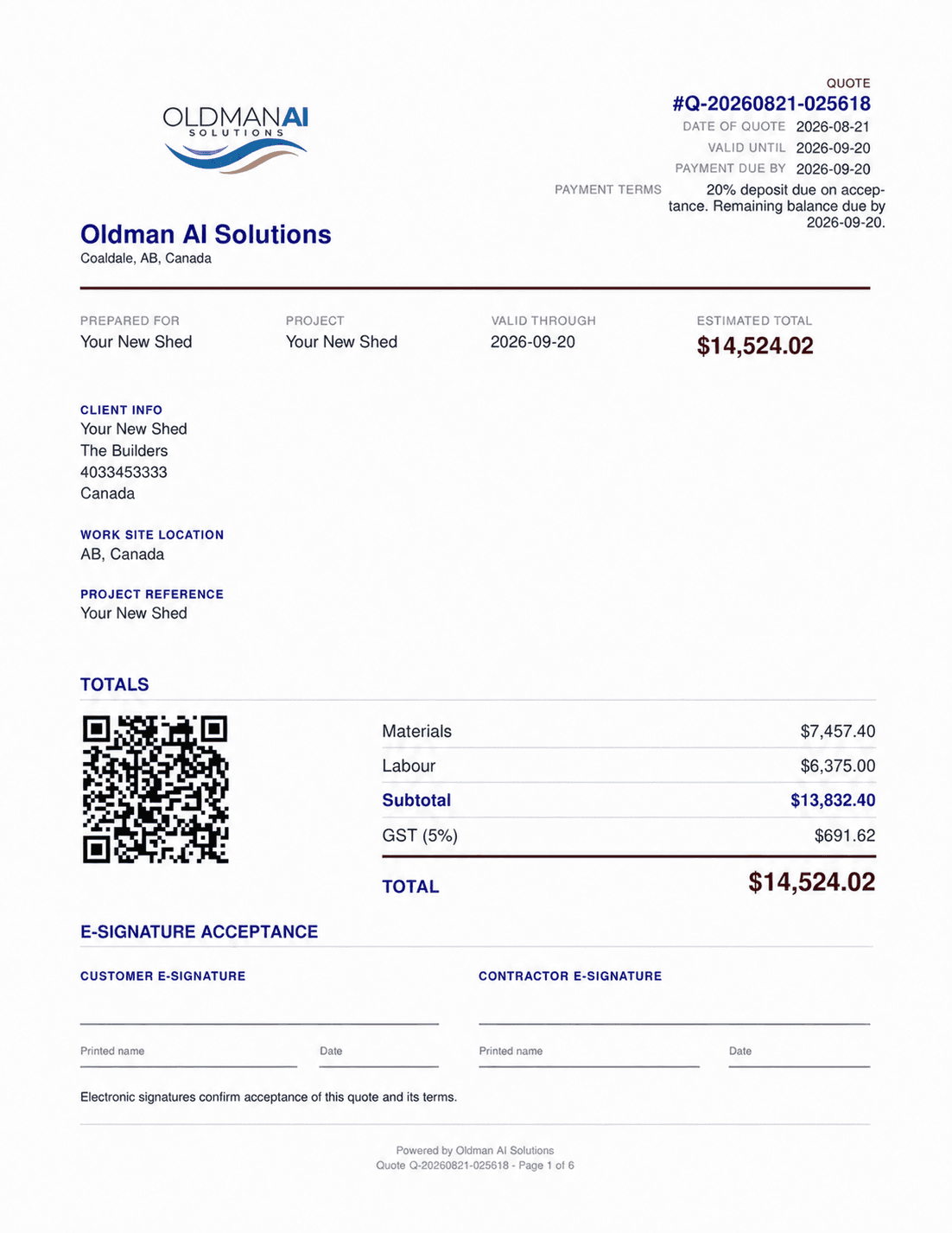
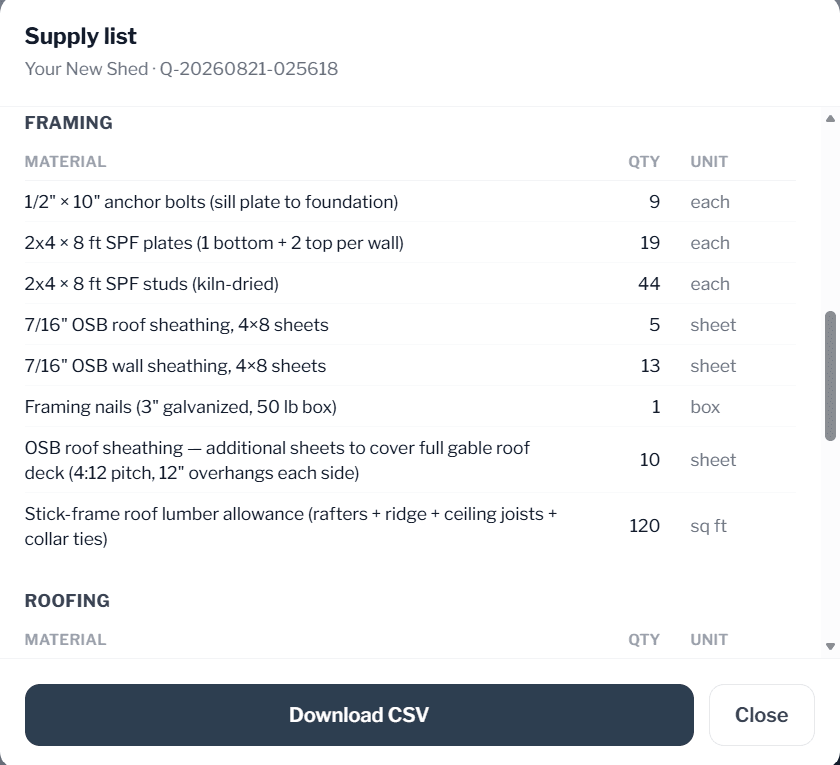
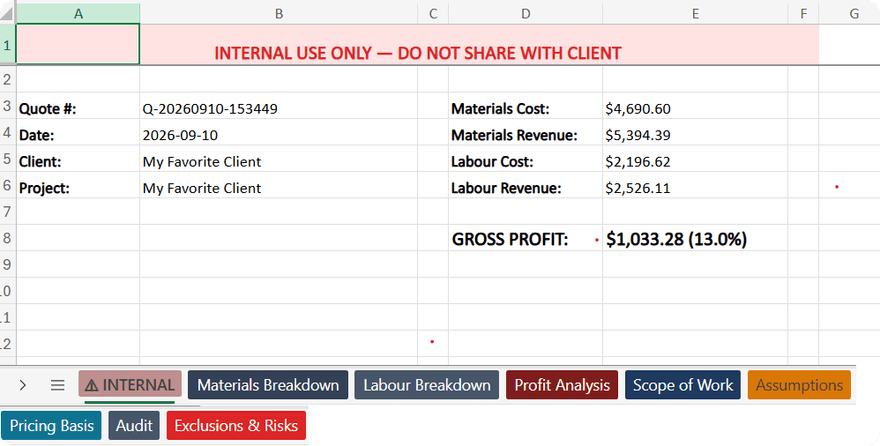
Your quote is a conversation, not a PDF in an inbox.
Clients get a signed link. They sign and accept, request changes, or decline right in the browser, and you know the moment they do. Revisions go out as a new signed link, and the full history stays.
They type their name, sign, and the deal closes. The signed quote, the audit detail, and the Excel master are all attached to the project record automatically.
A structured change request comes back. Click Revise, the prior quote reopens with every line editable, and the new version goes out as its own signed link.
You get the reason. The lead stays in the pipeline with the decline noted, so next quarter's follow-up isn't guesswork.
Straight answers.
Is the free quote really free?
Yes. One free quote every month, no card required. If it earns its keep, pick a plan. If not, you've lost nothing.
What can I upload?
PDFs, photos of the plans, or a sentence describing the job. Uploads run up to 10 pages on the free quote, 25 on Starter, 150 on Pro, and Team has no page limit. Big documents are read section by section, and the review panel shows you what got covered.
Whose prices does it use?
Yours first. Upload your supplier price sheets and labour rates, and where you've given us a number it wins outright. Anything else starts from built-in prices you can edit, and every line says where its price came from.
Does it add permits?
When you choose Add permits on Project Setup. New quotes start with permits left out. With Add permits, each permit is its own line. Where we have the municipality's fee schedule (Alberta, to start) we price it; where we don't, the line says To be confirmed instead of guessing.
Does my customer need an account?
No. They get a signed link that opens in any browser, with three buttons: accept, ask for changes, decline. Accepting asks them to type their name, which is what makes the signature count.
Does it work on my phone?
Yes. It runs in the browser on a phone, a tablet or a computer, so you can start a quote from the truck and finish it at the desk.
Can I cancel?
Anytime, from your account. No contracts.
Spend minutes on quoting. Not a weekend.
A free quote every month, on us. No card required. Bring the plans for the job you're bidding this week and see what comes out.